MyPlaceOnYT
#21Feb 27, 2016, 10:52 PM UTC · in reply to #19
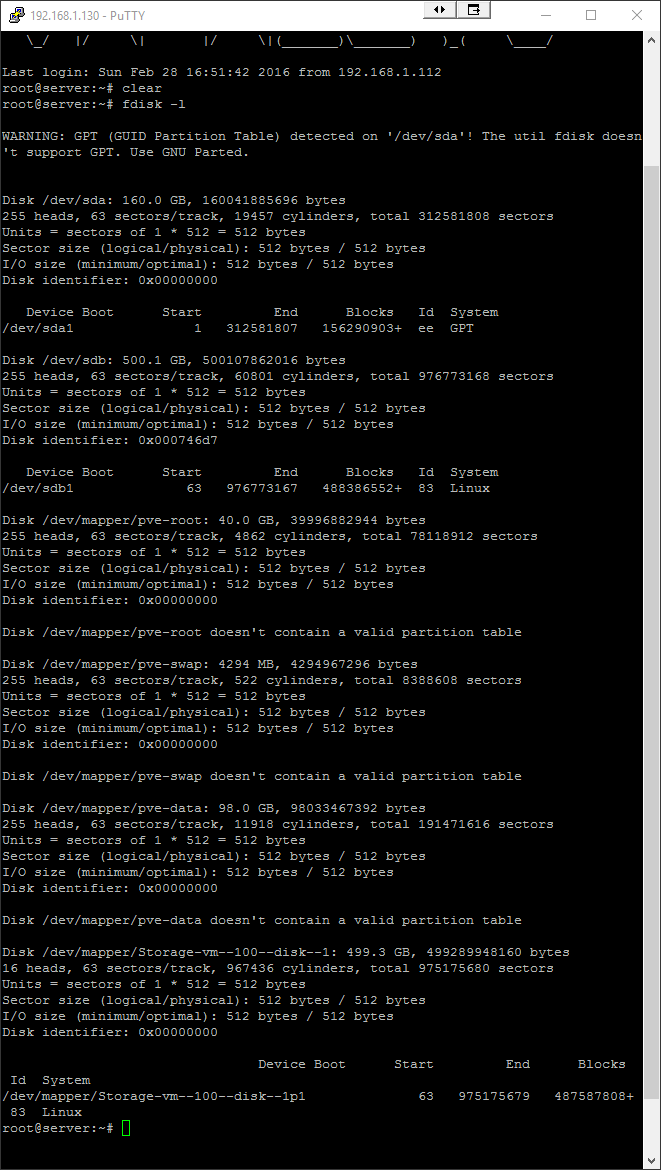
There ya go mate.
Forum / Servers / Virtualization & Containerization
There ya go mate.
@MyPlaceOnYT I’m trying to help you but you can’t seem to answer any question,
After that i see various partition that are most likely on those two disk, Are those partitions are for your Kermit VM? Yes or no Or it for all vms?
The 160 is my boot device, there is 70gb of that partitioned for the file server and the 500gb is dedicated to the file server.
Has this VM ever booted? Can you screenshot the ProxMox panel where the HDDs are listed?
Does any of the other vm work correctly? cause: … doesn’t contain a valid partition table -> is really not good, with any live cd you could check in 2 min if one of the drive is failling
No the VM has not booted. Been sitting there for 20hrs.
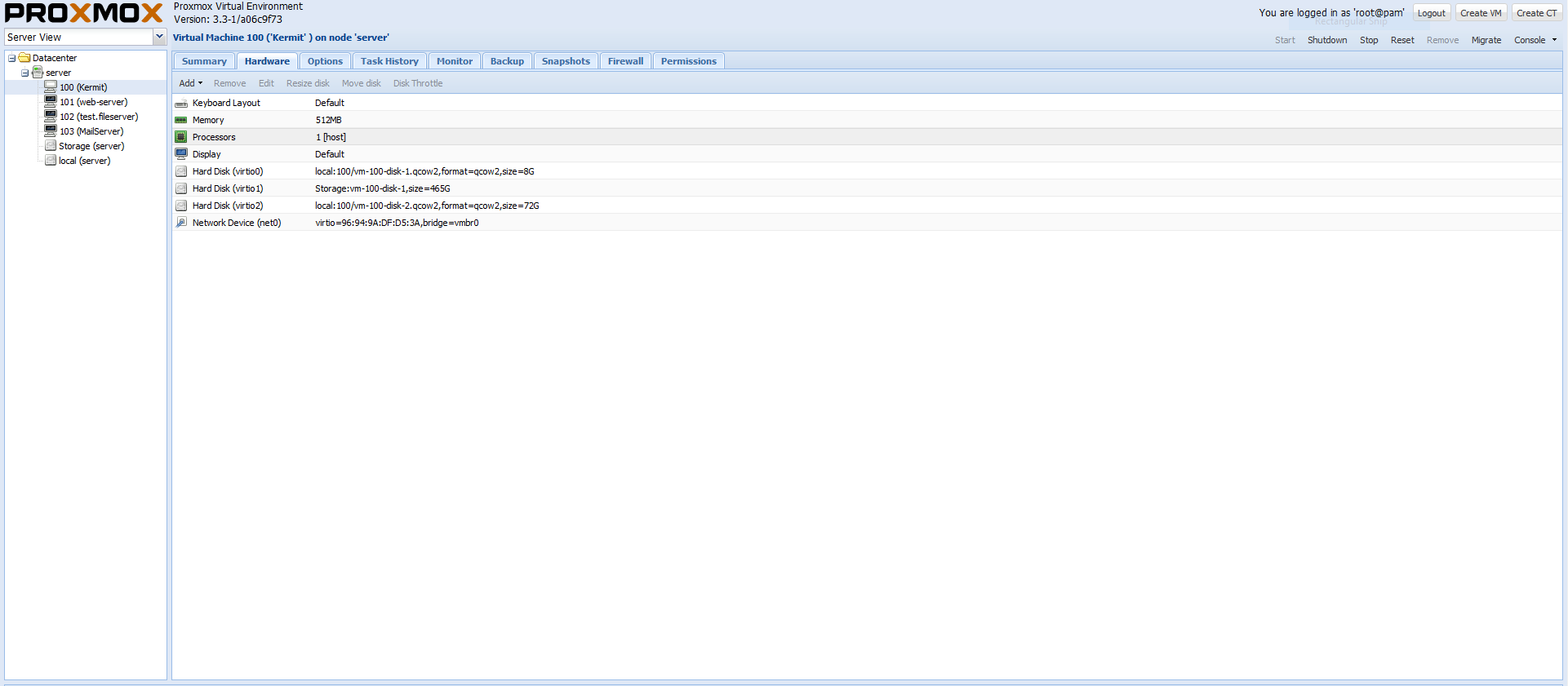
It has been sitting there for 20hrs or so frozen. All I can access is Proxmox.
Shut down that VM, create a new one with 1 VHDD for the OS, then once the install is done shut it down and add the second drive, from the other HDD.
Alright lads. Thanks for the help. I will shut everything down and buy a USB3 HDD dock and use Ext2FSD to read the 500gb HDD to get the DATA off it. The I will buy a 1TB red and a 120GB SSD and install Windows Server 2012R2.
It not linux the problem, you should never do a nas in a VM, go check this article link, it for freenas because of zfs but you can apply most of the topic to any nas… when you’re not in a vm partion are much simple
Check my NAS server fdisk
WARNING: GPT (GUID Partition Table) detected on ‘/dev/sda’! The util fdisk doesn’t support GPT. Use GNU Parted.
Disk /dev/sda: 3000.6 GB, 3000592982016 bytes 255 heads, 63 sectors/track, 364801 cylinders, total 5860533168 sectors Units = sectors of 1 * 512 = 512 bytes Sector size (logical/physical): 512 bytes / 4096 bytes I/O size (minimum/optimal): 4096 bytes / 4096 bytes Disk identifier: 0x00000000
Device Boot Start End Blocks Id System /dev/sda1 1 4294967295 2147483647+ ee GPT Partition 1 does not start on physical sector boundary.
Disk /dev/sdb: 320.1 GB, 320072933376 bytes 255 heads, 63 sectors/track, 38913 cylinders, total 625142448 sectors Units = sectors of 1 * 512 = 512 bytes Sector size (logical/physical): 512 bytes / 512 bytes I/O size (minimum/optimal): 512 bytes / 512 bytes Disk identifier: 0x000a21ff
Device Boot Start End Blocks Id System /dev/sdb1 * 2048 586133503 293065728 83 Linux /dev/sdb2 586133504 625141759 19504128 82 Linux swap / Solaris
As I stated earlier, I was looking at the SMART data wrong… I think its just a problem with the way you have it setup in ProxMox.
How does that work? It has been working fine for well over a year. 1 year and 2 months to be exact. Shutdown twice. Once to upgrade the RAM (witch was May last year) and another because of a power outage I think.
When I asked if you have ever booted the VM you said:
MyPlaceOnYT wrote:
No the VM has not booted. Been sitting there for 20hrs.
So I’m assuming from
MyPlaceOnYT wrote:
It has been working fine for well over a year. 1 year and 2 months to be exact.
It isn’t a new VM as I was led to believe.
Like I said it had been sitting at “/dev/vdc1: recovering journal” during the boot for the past 20 hrs … I said that in my first post.
I even showed a screen shot.
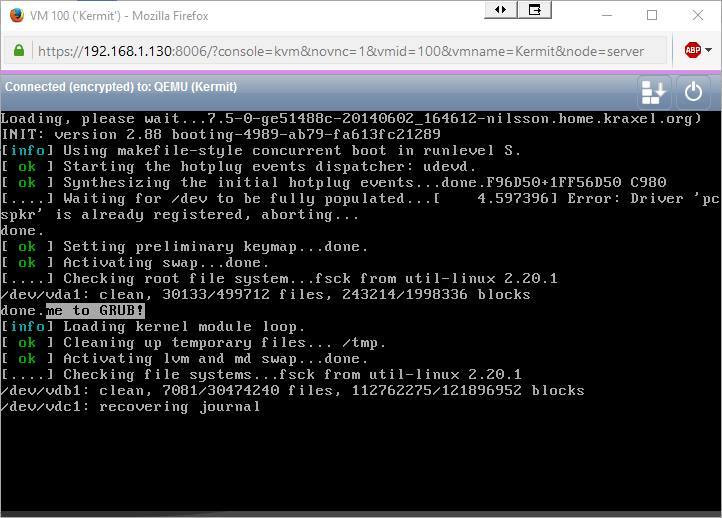
None of that shows that it wasn’t a new VM, which is what I asked. Let me look into the error some more…
Okay, right. I probably should have said. I don’t think you need to do that. I have already made my decision.
It seems to be a fairly common problem, I just haven’t found a solution yet… I would suggest, try spinning up one of your other VMs, see if they spit out the same error. Another thing you could try is boot the VM into recovery mode, and run
$ fsck
to run the repair manually. Did the VM get “stopped” or shutdown hard?
It has had to be stopped twice because it just freeze’s at that point I mentioned.
Sign in to reply.